Celestial Lunar Phase Plugin
Add a beautiful live moon phase display to your WordPress website.
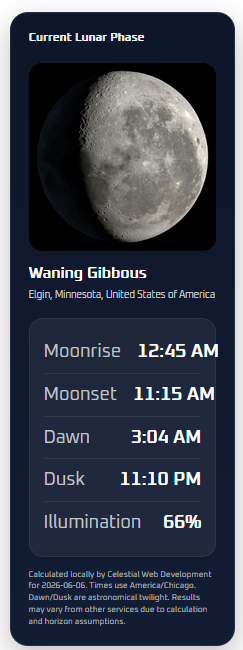
The Celestial Lunar Phase Widget displays the current lunar phase with a matching image, phase name, moonrise time, moonset time, astronomical dawn and dusk, and illumination percentage. Perfect for astronomy sites, educators, outreach groups, and space enthusiasts.
What the Plugin Displays
- Current lunar phase
- Matching moon phase image
- Phase name
- Moonrise time
- Moonset time
- Astronomical dawn and dusk
- Illumination percentage
- Location-based data
What’s New in Version 2.3.0
- Automatic Moon image orientation based on your configured hemisphere
- Manual orientation options: Automatic, Northern Hemisphere, Southern Hemisphere, and Original
- Improved WordPress.org metadata with five tags and a shorter description
- Tested up to WordPress 7.0
- Various usability improvements
Key Features
- No API key required
- Local astronomy calculation engine
- Easy shortcode: [celestial_lunar_phase_widget]
- Gutenberg block support
- Clean, modern moon phase display
- Local moon phase images bundled with the plugin
- Location lookup tool
- Use My Current Location button
- Timezone dropdown
- Simple setup screen with automatic and manual Moon image orientation
Location Setup
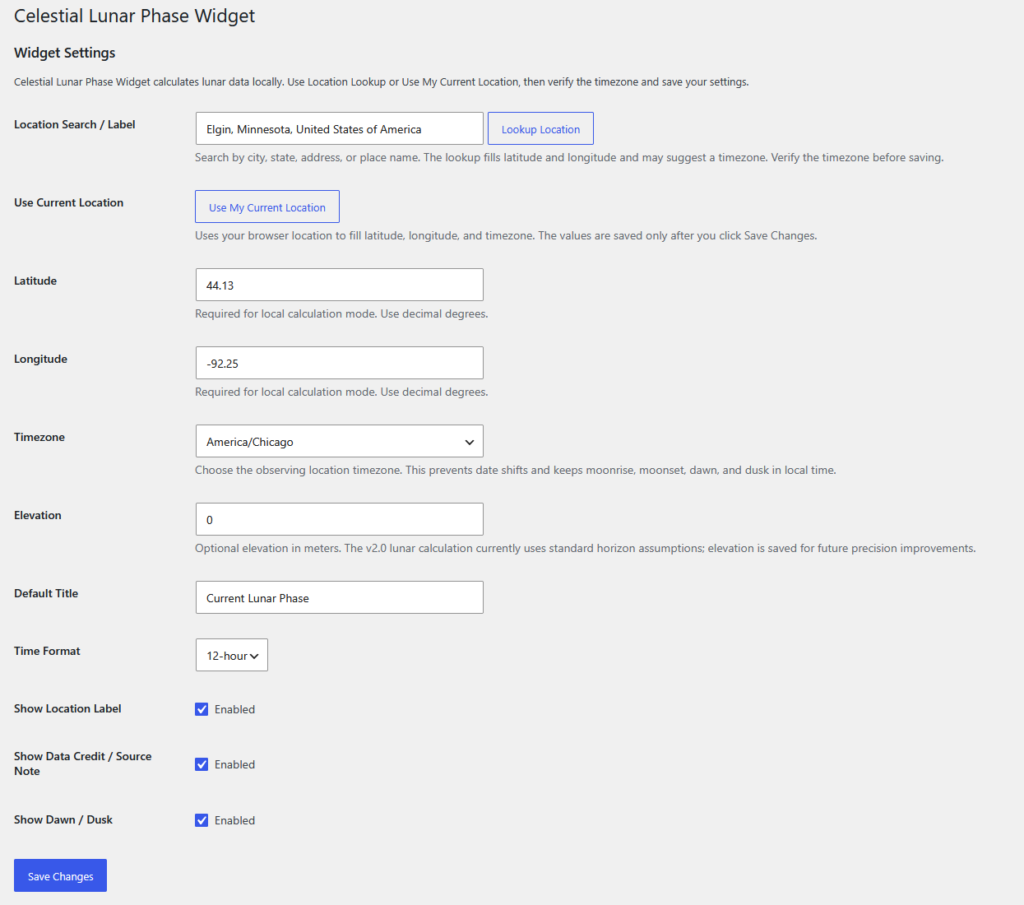
The plugin uses local astronomy calculations instead of a third-party lunar data API. After installing or updating, visit the plugin settings page and configure your location.
- Go to Settings → Celestial Lunar Phase Widget
- Use the location lookup tool, or click Use My Current Location
- Verify that latitude, longitude, and timezone are correct
- Choose Automatic, Northern Hemisphere, Southern Hemisphere, or Original under Moon Image Orientation, then save your settings
Existing installations may show an admin notice until location settings are completed.
Installation
- Upload the plugin ZIP in Plugins → Add New
- Activate the plugin
- Go to Settings → Celestial Lunar Phase Widget
- Configure your location, timezone, and Moon image orientation, then save your settings
- Add the block or shortcode to any page, post, or widget area
Shortcode
[celestial_lunar_phase_widget]
[celestial_lunar_phase_widget title="Tonight's Moon" show_credit="no"]
Add a Shortcode block and paste one of the examples above using a single pair of square brackets. The shorter shortcode [lunar_phase_widget] also works.
Screenshots
Widget Display
Setup Screen
Support
Need help or want to report an issue?
- Submit bug reports
- Request new features
- Get help with setup
- Request customization
Please include your WordPress version, plugin version, theme, location settings, timezone, and screenshots when reporting issues.
Frequently Asked Questions
Does this plugin require an API?
No astronomy API key is required. Lunar and solar calculations run locally on your WordPress server. The optional admin location lookup uses OpenStreetMap Nominatim to find coordinates; you can also enter coordinates manually.
Why do I need to configure a location?
Moonrise, moonset, astronomical dawn, and astronomical dusk are location-specific. Set your latitude, longitude, and timezone so the plugin can calculate local times. Automatic Moon image orientation also uses your latitude.
How accurate are the calculations?
The plugin uses local astronomy calculations based on your configured location, timezone, and date. Times may differ from other astronomy services because of location precision and differences in horizon, refraction, elevation, and calculation assumptions.
How does Moon image orientation work?
Automatic uses your configured latitude. Northern Hemisphere mode rotates the bundled image by 180 degrees; Southern Hemisphere and Original retain the bundled orientation. Choose your preferred option in Settings → Celestial Lunar Phase Widget.
This is a simplified hemisphere-based view. The exact apparent angle of the Moon also changes with date, time, and position in the sky.
What do Dawn and Dusk mean?
These labels show astronomical dawn and astronomical dusk, helping you identify the period of astronomical darkness.
Does it work with blocks?
Yes. You can use either the Gutenberg block or shortcode.
Can I use my current location?
Yes. The settings screen includes a Use My Current Location option that can fill in your coordinates and timezone.
Can I customize it?
Yes. Celestial Web Development offers customization, integration, and plugin development services.
About Celestial Web Development
Celestial Web Development specializes in WordPress development, customization, plugin development, and hosting solutions.
Email: john@celestialwebdevelopment.com
Live Example